Page 1 of 1

Ecuflah strange display in vista

PostPosted: Tue Sep 18, 2007 2:35 pm
by Stage
Here is what I got in ECU Flash on windows Vista
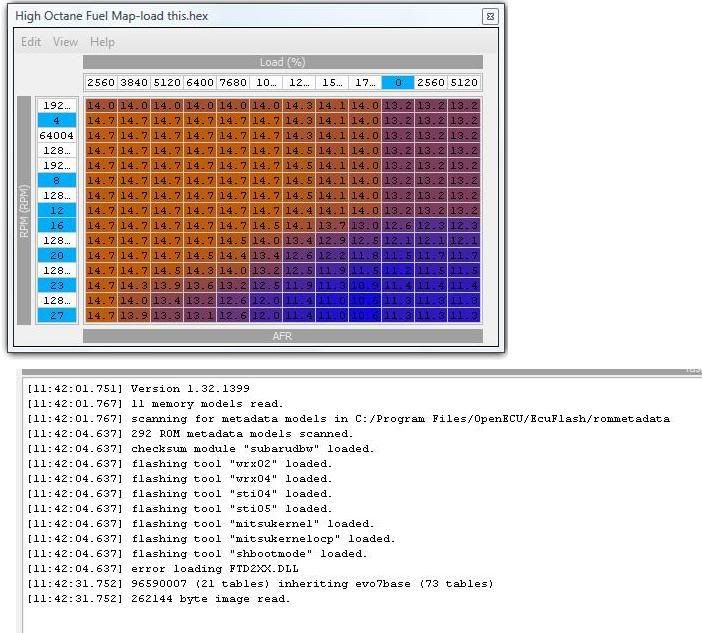
Image

I got the lastest version 1.32 installed, hwat could be the problem ?

I changed my regional setting from comma to dots to be like you guys in the US since I got a fr/can version of vista but it didint fix the problem.

Thanks!

PostPosted: Wed Oct 03, 2007 12:28 am
by Zakie@TIC
I got the same problem after installing 1.33, so got back to 1.3. Will appreciate some advice in getting it to work, I'm on XP sp2.

PostPosted: Wed Oct 03, 2007 5:18 am
by merchgod
You can't use old definitions with Ecuflash versions 1.31 and up. You can, but you would need to go through the base xml and change each endian attribute to the opposite of what it is currently defined as (little/big).

PostPosted: Tue Oct 23, 2007 4:00 pm
by radsdau
:!:
Colby, I don't suppose you could implement a new tag for the late revision (1.3-) XMLs could you, so you could tell which ones have been "endian-fixed" or not? It could get awfully confusing having lots of different XML versions floating around.
The presence of the tag would indicate if the fix was done.

* Better still: a tag that indicates the version of the XML, then ECUFlash could automatically flip the endian on the load-in for old versions.

What do you think? Is there a better way?

PostPosted: Thu Nov 15, 2007 12:21 pm
by Stage
Could someone explain me how to convert the old XML files to work with the newer version of ecuflash clearly ? I'm a newbie in all this but with a good exemple I should be able to convert the files that I need! hehe

Or maybe someone could convert me the file that I attached so I could compare.

Thank you!

PostPosted: Thu Nov 22, 2007 12:53 pm
by LogicGate
Contact user with evo7base.xml with corrections to show the information properly.

Solution!

PostPosted: Thu Nov 22, 2007 1:19 pm
by Stage
Here is the evo7base file that need to be remplaced to fix the problem.

Just rename this file to .xml and remplace it in your rommedata folder and that's it!

PostPosted: Thu Nov 22, 2007 1:24 pm
by Stage
LogicGate wrote:Contact user with evo7base.xml with corrections to show the information properly.


Lol sorry didnt saw your reply ;)